
Accessibility has long been foundational to how JSTOR designs, develops, and delivers its digital products. As public institutions in the United States prepare for the updated ADA Title II requirements—including clearer expectations for accessible web applications—we’re advancing accessibility across our offerings. This includes not only the JSTOR research platform itself and the scholarly content it makes accessible to researchers, but also the tools that librarians, archivists, and other stewards use to manage and share digital collections.
With JSTOR Stewardship, we committed to building a platform that aligns with current accessibility standards and development practices.
In April 2025, we launched JSTOR Digital Stewardship Services, bringing together tools to process, manage, share, and preserve archival and special collections materials. JSTOR Stewardship is designed to help archivists, librarians, and other stewards of unique resources maximize discovery and impact by utilizing modern back-end tools to manage their collections and place their content directly on JSTOR—the trusted, global research platform where collections can be discovered and used by researchers worldwide.
Over the years, JSTOR has benefited from ongoing accessibility work and shared standards, while JSTOR Forum—a long-standing back-end tool for cataloging and metadata management—was built on older patterns that didn’t benefit from the same foundation. With JSTOR Stewardship, we committed to building a platform that aligns with current accessibility standards and development practices, and will ultimately replace Forum. This approach reflects how accessibility is embedded in our product development process—from architecture and design decisions, to testing practices and transparent documentation.
As JSTOR’s web accessibility lead, I believe this work is important both to undertake and to share. In this piece, I’ll describe how JSTOR Stewardship itself was designed and developed to meet accessibility standards, what that looks like in practice, and why it matters for the people who use the tool.
Learning from accessibility audits
As part of JSTOR’s regular accessibility practices, and in support of institutions seeking to understand how our services support accessibility, we recently conducted a comprehensive accessibility audit of Forum. The findings were consistent with what often happens when long-standing products evolve over time: older code patterns and components had accumulated, making accessibility issues harder to address without larger structural changes.
In Forum’s case, the audit highlighted barriers affecting those using screen readers and keyboard navigation, often tracing back to elements built before JSTOR adopted a unified design system and centralized accessibility testing. The audit helped clarify how we could leverage those more recent systematic advancements to deliver the most meaningful improvements—and gave us a clear roadmap for what to address as we transitioned Forum into JSTOR Stewardship.
The audit also landed at a moment when U.S. public institutions are paying renewed attention to digital accessibility, with updated ADA Title II regulations beginning in April 2026. Many of these institutions rely on our products, so we have a responsibility to maintain and document transparent, continually improving accessibility practices so our tools align with evolving standards. The audit clarified where we needed to strengthen JSTOR Stewardship to ensure the tool meets current accessibility standards and institutional requirements.
Adopting an architecture that supports accessibility
For JSTOR Stewardship, our engineering team adopted a micro frontend (MFE) architecture that aligns with a broader shift toward more flexible, maintainable systems across JSTOR’s product suite. In a nutshell, micro frontends let a large web product be built as smaller, self-contained modules that can be developed and released independently, while still feeling like one cohesive experience for users.
The key benefits include faster, more independent shipping by teams; safer, more modular changes; easier incremental modernization of a legacy product; and a more consistent user experience when everything is built on shared, accessibility-tested design system components.
This approach has concrete accessibility benefits as well. It’s easier to build and validate accessibility earlier and more often at the level of specific workflows (like metadata editing or bulk actions), rather than retrofitting fixes after the fact. Modular delivery also makes it easier to ship targeted improvements without destabilizing unrelated areas of the interface.
By adopting a micro frontend architecture, our engineers systematically addressed issues identified in the Forum audit, and built JSTOR Stewardship to support the same core workflows, with accessibility integrated from the beginning.
Building on an accessible design system
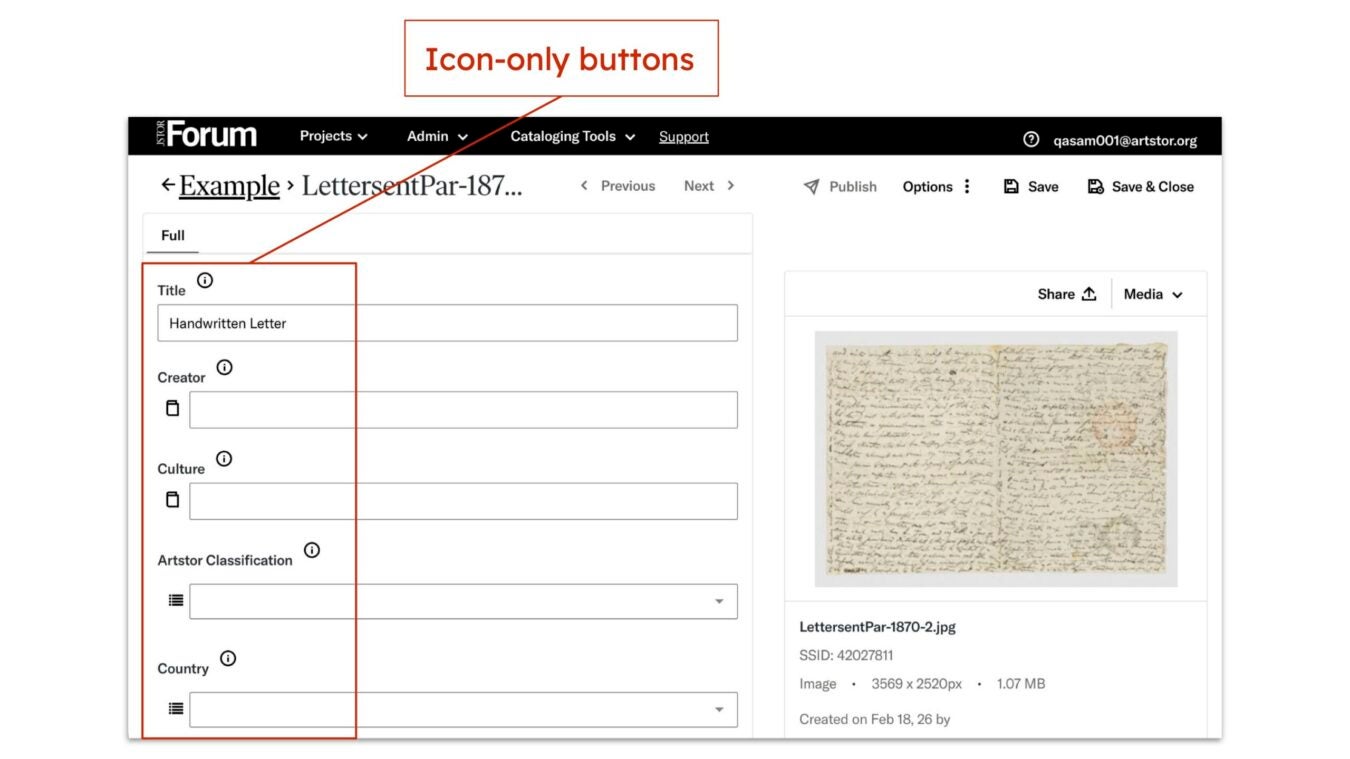
JSTOR Stewardship benefits from JSTOR’s shared Pharos design system, which provides a consistent set of interface components used across products. Because these components are designed with accessibility in mind—well-structured semantics, predictable keyboard interactions, and standards-compliant color palettes—any screen built with Pharos inherits these foundations without requiring separate, bespoke fixes.
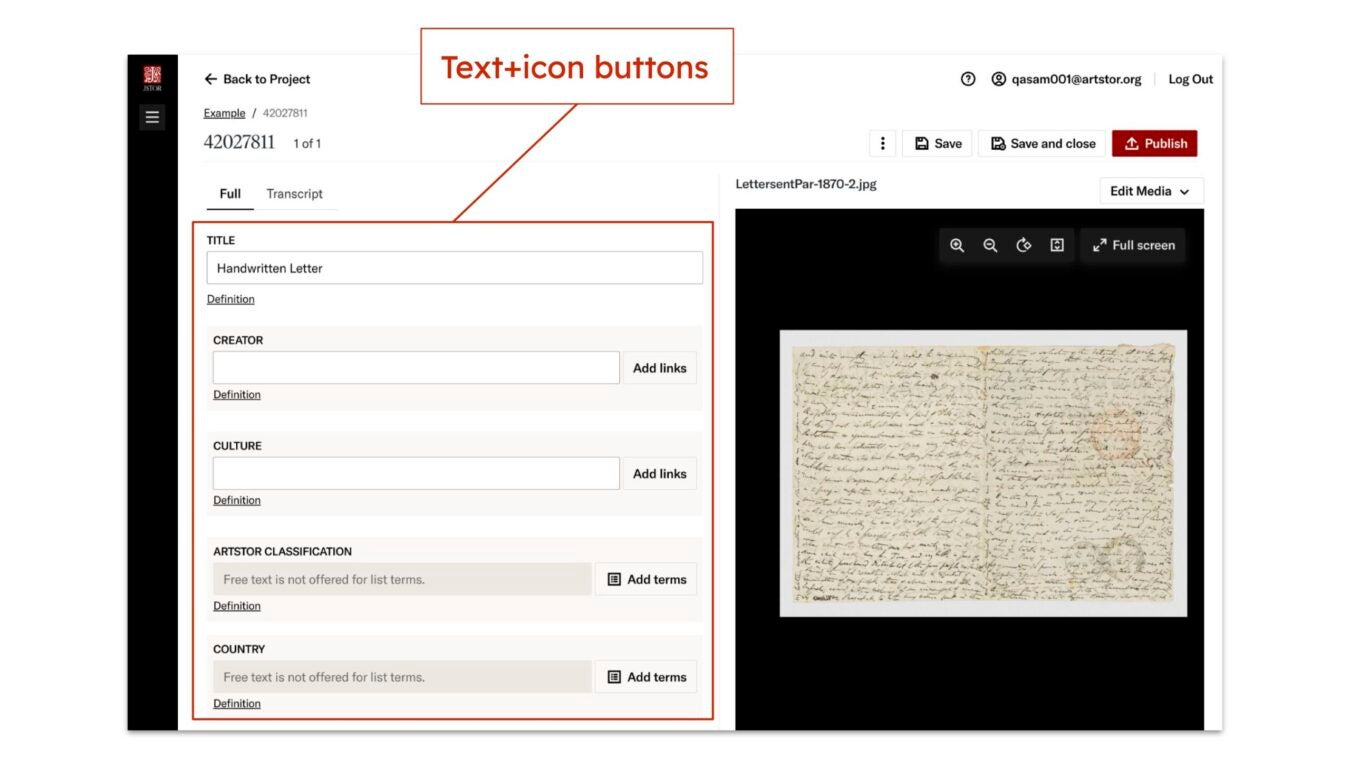
In practice, this makes the JSTOR Stewardship interface more consistent and navigable for keyboard and assistive tech users by moving beyond Forum’s custom widgets, which were harder to use with assistive technologies. And because Pharos is maintained across teams in an open-source model, JSTOR Stewardship inherits ongoing improvements and testing without requiring each team to recreate foundational accessibility work. This shared foundation increases consistency for users, and helps ensure updates don’t unintentionally introduce new accessibility issues across products, because teams are building on tested, verified components.
Even a great design system only works if teams use it consistently and intentionally—so the collaboration around it matters. Beyond the system itself, accessibility considerations are central to cross-team design collaboration. Designers and engineers regularly partner with me as the accessibility lead: reviewing concepts during accessibility drop-in hours, discussing edge cases in team meetings, and documenting accessibility requirements directly in design specifications. This reflects the approach we aim for: accessibility integrated into the design process rather than treated as a final-stage checklist.
Automated testing for better quality
JSTOR Stewardship also benefits from JSTOR’s automated accessibility testing framework, which supplements manual reviews and design evaluations. This reflects a broader shift we’ve made toward continuous accessibility practices rather than relying on a single annual audit. Automated scans run during development and serve as a safeguard by identifying issues that can be programmatically detected. If scans uncover problems, they are addressed before code can be deployed.
Importantly, automated testing is not a replacement for human evaluation, but it is a valuable part of maintaining a consistent baseline across all products. Together with other measures, this system strengthens the reliability of accessibility work over time, and ensures that common errors do not unintentionally reach production. In doing so, it helps keep our teams focused on building forward rather than rolling back preventable mistakes.
Updated VPAT and institutional transparency
Software procurement at colleges and universities usually involves the review of a vendor’s Voluntary Product Accessibility Template (VPAT), which is a standardized format used to report how well a product meets accessibility requirements. When completed, the VPAT is typically shared as an Accessibility Conformance Report (ACR). These reports help institutions assess risk, plan accommodations, and make informed purchasing decisions.
As an outcome of the audit and all the work that followed, and to support institutions in evaluating JSTOR Stewardship, we produced an updated VPAT. The document reflects the current accessibility status of the product, documenting improvements made and acknowledging a small number of known limitations that are planned for remediation in 2026.
Providing this documentation is part of our commitment to transparency, and to being a trustworthy partner to our community. When issues exist, we document them. And when we fix them, we want that progress to show up not only in the product experience, but in how we communicate with partners making real decisions under real constraints.
Continuing the work
A commitment to accessibility—to removing barriers rather than adding new ones—is one of the clearest expressions of good faith a product team can make. Sharing the “why” behind the work helps connect day-to-day interface changes to the larger goal: in this case, making JSTOR Stewardship usable for more people, in more contexts.
Accessibility work can be hard to see at a glance. Many improvements are intentionally subtle: small refinements to structure, navigation, and interaction patterns that make the interface work better with screen readers, keyboards, and other assistive technologies. Over time, those refinements add up to workflows that are more consistent, resilient, and usable in more contexts.
A commitment to accessibility—to removing barriers rather than adding new ones—is one of the clearest expressions of good faith a product team can make. Sharing the “why” behind the work helps connect day-to-day interface changes to the larger goal: in this case, making JSTOR Stewardship usable for more people, in more contexts.
Accessibility is an ongoing practice rather than a finite project. Standards evolve, user needs shift, and technology changes. The transition from Forum to JSTOR Stewardship illustrates how intentional practices, shared approaches, and cross-team collaboration help us build more accessible—and more maintainable—digital experiences. As institutions assess digital accessibility with renewed focus, we aim to be a partner that demonstrates thoughtful progress, clear communication, and a deep commitment to equitable access to knowledge.
To learn more about how we approach accessibility across JSTOR products, explore our policies. And if you’d like to see how these practices show up in real tools, learn more about JSTOR Digital Stewardship Services.